Version 1 - Summary
The first major release (version 1.x) implements key goals as summarised the Introduction. The design is based on Component-Base-Software-Engineering (CBSE). So, xLandscape is not a model but a framework to build models, with a core functionality for numeric, multidimensional landscape modelling.
xLandscape major entities:
- Core: inspired by microkernel architecture in CBSE context. Represents key features of the modular landscape modelling approach. Components are connected to the core and controlled by the core (necessary minimum). Provides a multidimensional data store. Organises model inputs.
- Components: colloquial the modules of the modular approach. Represent the actual funtionality of a landscape model. Can be quite simple (eg, estimation of water temperature from air) or quite complex (eg, calculating substance transport in streams). Technically precise, components are build from wrapping scientific models (called 'the module of a component').
- xLandscape Models: an applicable landscape model for a specific purpose. The composition of components and the core (Example xLandscape Models).
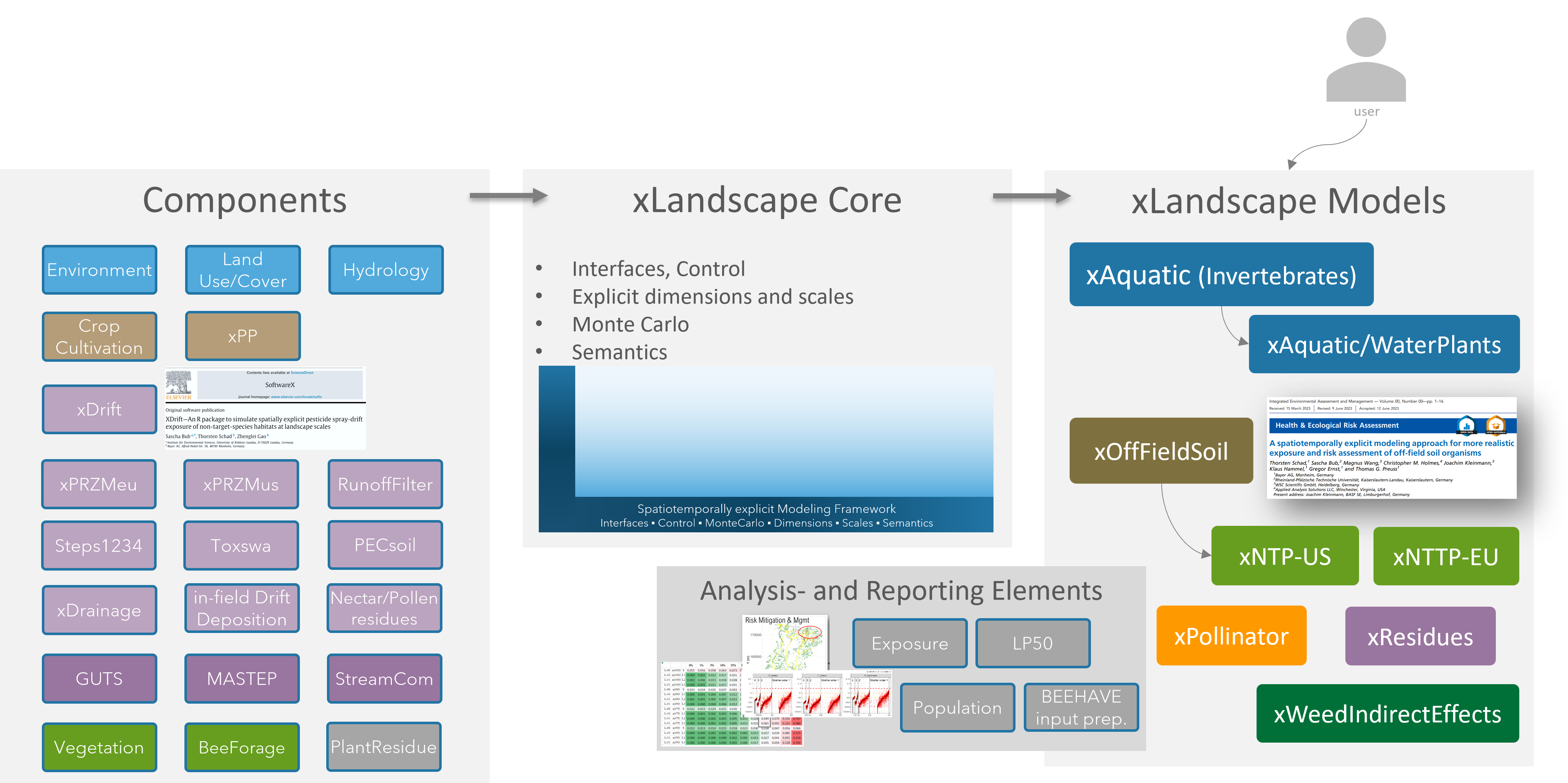
Illustration of the xLandscape ecosystem: components, Core, Models, as well as 'Analysis&Reporting Elements'
xLandscape Characteristics:
- Numeric approach that works with discretised entities: time is discretised in time steps (any step possible, 'hour' and 'day' are typical in different processes). Spatial entities can be eg, vector polygons or raster cells. This makes xLandscape a spatiotemporally explicit model.
- Explicit scales: phenomenons like variability are assigned to specific scales. Eg, variability of spray-drift deposition might be observed on a field-scale. Likewise, explicit scales serve as important units in the analysis of landscape modelling outcome, eg. to provide endpoints that fit to the definition of Specific Protection Goals.
- Monte Carlo: variability (and uncertainty) are represented by Probability Density Functions (PDFs). This, together with the spatiotemporally explicit approach, provides the functionality to propagate variability of landscape processes, activities and dynamics to landscape model outputs.
- Multidimensional data storage: Environmental characteristics, agriculture, PPP use, exposure, effects and their attributes, space and time, make xLandscape a multidimensional approach. These data are stored in a multidimensional storage. Currently, the Hierarchical Data Format (HDF) is used. At the end of a xLandscape-based model simulation all data resides in the HDF store.
- Semantics: xLandscape introduces semantics to improve meaning of data. This is done in a stepwise way. Currently, values have a unit and scale assigned.
- Sequential processing: in version 1.x components are executed in a sequential order.
- 'xcopy' distribution: an xLandscape-based model can be copied (downloaded) and used without installation. The xLandscape core comes with its Python environment and each component with their required runtime environment.
- Scalability: basically, the spatial and temporal extent, as well as other simulation characteristics (eg, the number and detail of endpoints) are only limited by computing ressources. Scaleability is a central requirement, also to the design of components. Ideally, processes should show a linear scaling behaviour. Besides actual landscape models build with xLandscape, the related analysis software need to cope with (large) raw data volumes typically generated.
- Scenarios: each specific model built with the xLandscape approach has its specific scenario requirements. As long as data requirements can be fulfilled, scenarios of any (global) region and any time period can be used as model input. Scenarios can be of any spatial shape. See also scenarios in the Glossary.
- Analysis- and Reporting Elements: example analysis code and outputs (eg, tables, graphics) are prepared. Typically, Jupyter notebooks are used, each focusing on a certain analysis topic.
Applicability
The application of xLandscape framework is not limited to its original key purpose for RA, ie to generate model results for RA endpoints (exposure, effects). xLandscape can be employed for modelling quite a large range of spatiotemporally phenomenon, eg, to model the spatiotemporally occurrence of bee forage (nectar, pollen), the use of pesticides in cultivated landscapes, the toxic loads of chemicals in landscapes, etc.
Programming Language
The xLandscape core and components building software are written in Python. This language was choosen for its properties, popularity and ease to learn. However, compute demanding processes can be written in basically any language (eg, C, C++, Go) and be integrated as Python packages.
The inner model of components can be written basically in any language. The component building process wraps such software, typically including the software (model) specific runtime environment.
Development is versioned and currently done using Github (Github/xLandscape).
Core
The modular approach of xLandscape does not intend to loosely couple models. There is a 'framing' element necessary to represent characteristics that make a landscape model according to the use context, goals and requirements (see Intro).
The 'core and component' design was inspired by microkernel architecture in Component-based Software Engineering (CBSE) context. Represents key features of the modular landscape modelling approach.
Key core functionality and characteristics:
- The core provides the (Python) framework to build components (eg, interfaces for data exchange, data semantics, initialisation, control, component self-description, status request)
- The core provides the framework to build compositions, ie actual landscape models (currently implemented as XML)
- The core provides the framework for a 'semantic context' that enables operating with explicit entities (eg, scales) and assures inner landscape model data consistency
- The core provides the framework for operating with multidimensional data
- The core provides functionality for landscape simulation control, status observer, ressources and logging
- The core provides functionality for reading the parameterisation and configuration of a Landscape Model as defined by the user
This is illustrated as the blue 'L' together with the light blue background in xLandscape model schemes:
xlandscape core illustration
Components
Essentially all functionality is represented by components.
Components are initiated by and operated in the framework of the core. A composition of the core and components make a Landscape Model.
Components can contain and represent basically any simulation model, eg,
- (Large) Mechanistic models, eg, simulating substance exposure, fate and effects (eg, PRZM, PEARL, Macro, Cascade-Toxswa, GUTS, Mastep, Streamcom)
- Data-driven models, eg, representing variability of spray-drift deposition (eg, xDrift, AgDrift), results from ecotoxicologial studies (eg, Dose-response, Species Sensitivity Distributions, Toxic-Load), or lookup tables (eg, bee forage production by vegetation and time)
- Hybrid models, eg, for simulating residues of substances in plants and commodities
- Models simulating agricultural management, eg, PPP use (eg, xCropProtection)
- Small calculations, eg for modelling specific environmental conditions (eg, sunshine hours, water temperature)
- (Geo)data inputs: external data is imported into a Landscape Model using specific components, eg, weather, land use, or soil data. Besides such explicit data inputs. This applies, eg, when complex mechanistic models bring some default settings with them which are loaded using text-files.
- Analysis: when a simulation is done it might be nice to see some analysis automatically. So, components can be build and integrated into a Landscape Model for analysis purposes
Colloquially, we might call the pieces of a modular Landscape Model modules, eg say 'xDrift is a module in the xAquatic landscape model', or 'in which repository can I find the module for PPP use?'.
However, following the terminology of Component-Based-Software-Engineering (CBSE), we need to be more precise and talk about components. A component contains a model which is also called a module. Models (modules) represent the actual functionality.
A model (module) becomes a xLandscape component when it is wrapped using the xLandscape core framework.
The graphic below shows the design of a component:
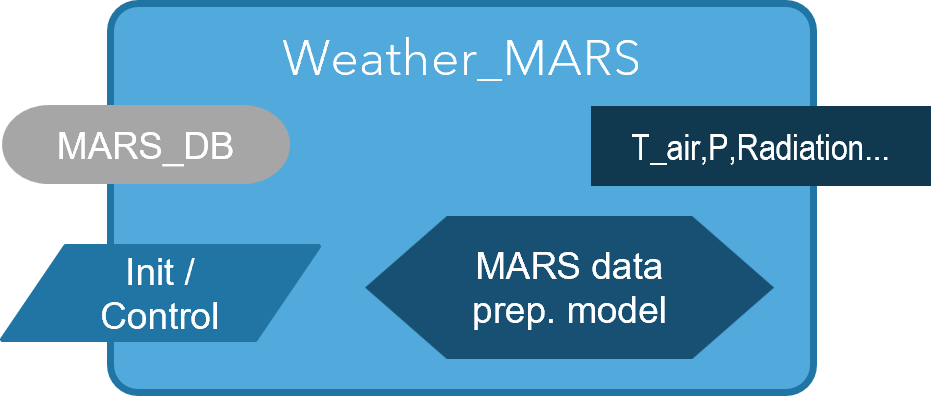
Component 'Stream_Temperature' representing a model to estimate stream temperature (T_stream) from air temperature (T_air). (a blue background indicates connection to an internal source (semantically enriched), whereas a grey background represents connection to external sources; the diamond represents the actual model ('module'))
A component has the following elements:
- Input: the data input to be processed by the component. Inputs can be connected to external data sources (eg, files, data bases, APIs) (grey background) or to the internal multidimensional store (blue background)
- Init/Control: inputs for the initialisation and control of a component and its module (model). Init/Control can come from external data sources (eg, xml/text files) (grey background) or from the internal multidimensional store (blue background)
- Output: the data output of a component. Outputs are typically written to the internal multidimensional store (blue background) yet, can also be written to external data storages (eg, Relational Database Management Systems, files, cloud storage) (grey background)
- Module (model): the actual model (module) that provides the functionality, ie, conducts the simulation (blue diamond element)
All internal data (information) is semantically-enriched (see Semantics).
Components typically have multiple in- and outputs.
Example components are introduced in section Components.
Landscape Model Composition
A composition of components and the core builds a landscape model. Example Landscape Models built are xAquatic, to simulate exposure and effects of aquatic organisms in catchments, xOff-Field-Soil, to calculate exposure of soil organisms living next to fields, or xPollinator to simulate nectar and pollen occurrence for building bee modelling scenarios.
The graphic below shows the composition of a very simple Landscape Model that inputs a stream network, together with weather data, in order to calculate stream temperature:
- The model is built using 2 components: 'Weather_MARS' inputs (external) weather data (from the EU 'MARS' database) and writes defined data (eg, air temperature, T_air) into the landscape model storage, whereas component 'Stream_Temperature' takes T_air from the store and transfers this to an estimated stream temperature (T_stream) using a model.
- The blue 'L' represents the xLandscape core. The light blue rectancle-shaped background represents the semantically-enriched space of this specific model (eg, T_air is defined with a unit and assigned spatial and temporal scales; T_air is consistantly available to all components of the model).
- The Landscape Model is parameterised and configured using XML and YAML files (eg, to define the landscape scenario and simulation time period; grey box)
- Typical landscape model input data (green box) comprises land use/cover, weather, habitats and pesticide use, yet, depends on the landscape model.
- The Data Storage contains all data defined by the landscape model designer, as relevant to the landscape model application (inputs, interim, and model outputs). Thus, the Data Storage can be recognised as representing 'the landscape' from the view of the model purpose. Eg, xAquatic stores data on land use, weather, hydrology, PPP use, stream exposure and effects on aquatic invertegrates, whereas xPollinator outputs stores nectar and pollen occurrence by space and time. The Data Storage is multidimensional.
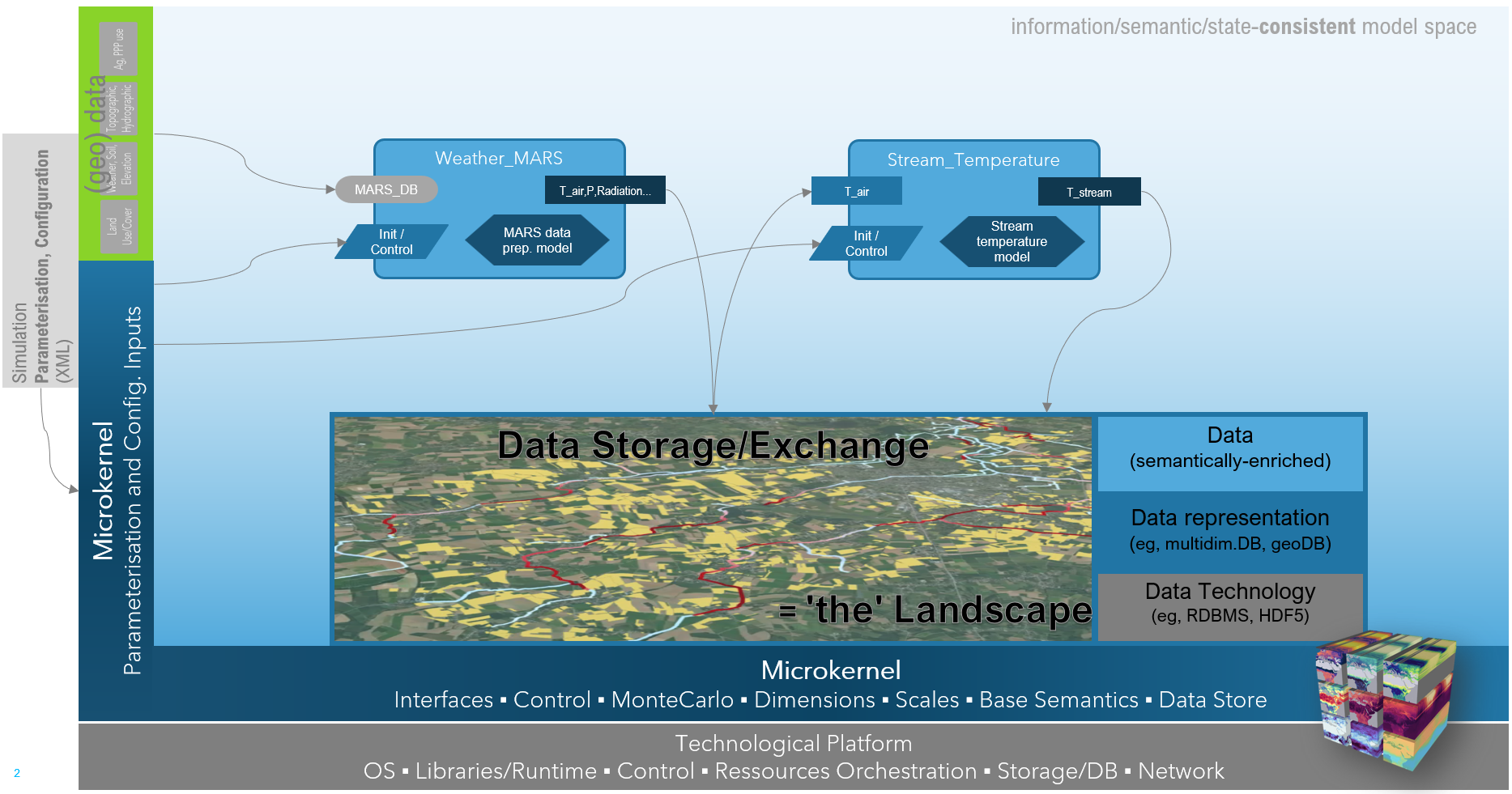
Illustration of a simple Landscape Model, built from 2 components (Weather_MARS, Stream_Temperature) and the xlandscape core
Propagation of Variability
Taking the protection of species' populations in cultivated landscapes as an example topic for xLandscape, from the use of PPPs in landscapes to the exposure pattern of non-target-organisms many processes and phenomenons come with a range of variabilities (eg, weather conditions, land use/cover dynamics, agricultural management and PPP use, species occurrence and behaviour, etc.).
xLandscape basically 'resolves' such variabilities by discretisation, ie by making things explicit (this is, what the suffix 'x' represents). Eg, the actually continuous (simulation) time is discretised into time steps (of any interval, often [day] or [hour]), spatial entities are discretised using resolutions depending on the individual process (eg, [1m2] for local spray-drift exposure, [100m] segments of stream networks).
However, explicitness alone is not a sufficient means to represent natural variability of phenomenons, events and processes, of natural systems, eg, an explicit representation of land use (in space and time) requires that land use is deterministically know for the simulation region and the simulation period (eg use satellite classification). This is often not the case and only general knowledge is available (eg, statistical data and crop cultivation and rotation). Even if full deterministic data is available for a phenomenon (eg, for weather representation by using long-term records) the purpose of a landscape simulation might require to go beyond actual data and consider situations (eg, extremes) which are not part of an actual record. This is a typical situation in regulatory risk assessment where the range of conditions that might happen has to be considered in order for the (prospective) decision making to cover these.
This is where the use of distributions comes in. In xLandscape, variability can be represented as Probability Density Functions (PDFs). Examples for using PDFs are wind direction distributions, PPP application windows and application rates, local spray-drift depositions in the (xDrift) component or drift-filtering by riparian vegetation.
The scope of validity of a PDF and its elements have to be defined, eg, a weather conditions representing PDF might be valid for a certain geographic regions and a certain time period, it's elements might be valid for a certain day. Thus, samples drawn from this PDF are associated to the scales [region,day]. Irrespective which component asks for weather conditions, the result should be the same for the same region and day, but different for different regions and/or days (corresponding to the random sample of the PDF).
This mechanism of scale-dependent definition and use of PDFs enables to build a Monte Carlo approach that generates naturally occuring pattern of the simulated agro-environmental system. In other words, real-world variability comes with pattern, ie, is not just random (an overly simple, independently sampling Monte Carlo approach would just generate chaotic situations).
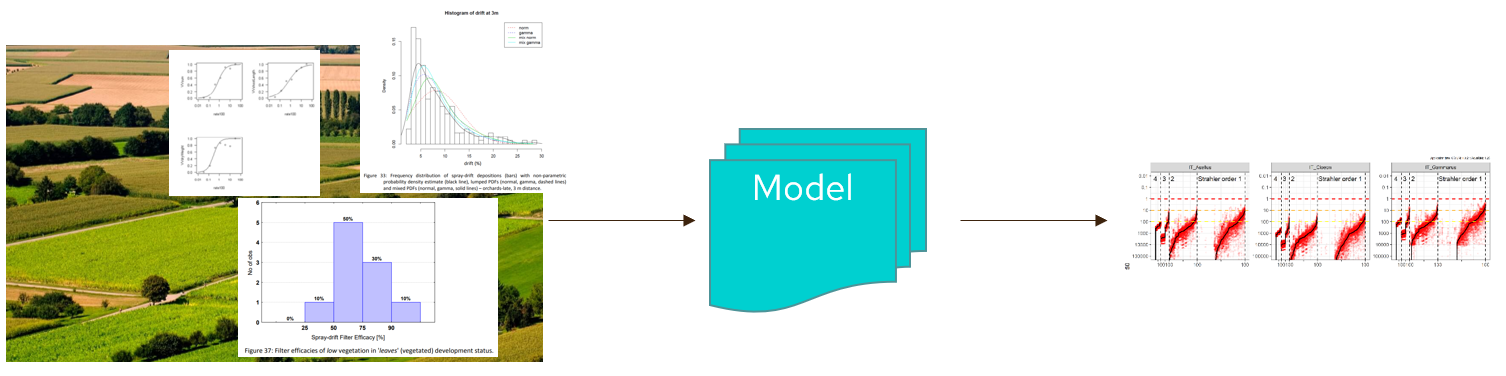
Propagation of landscape agro-environmental system variability to variability of model predictions
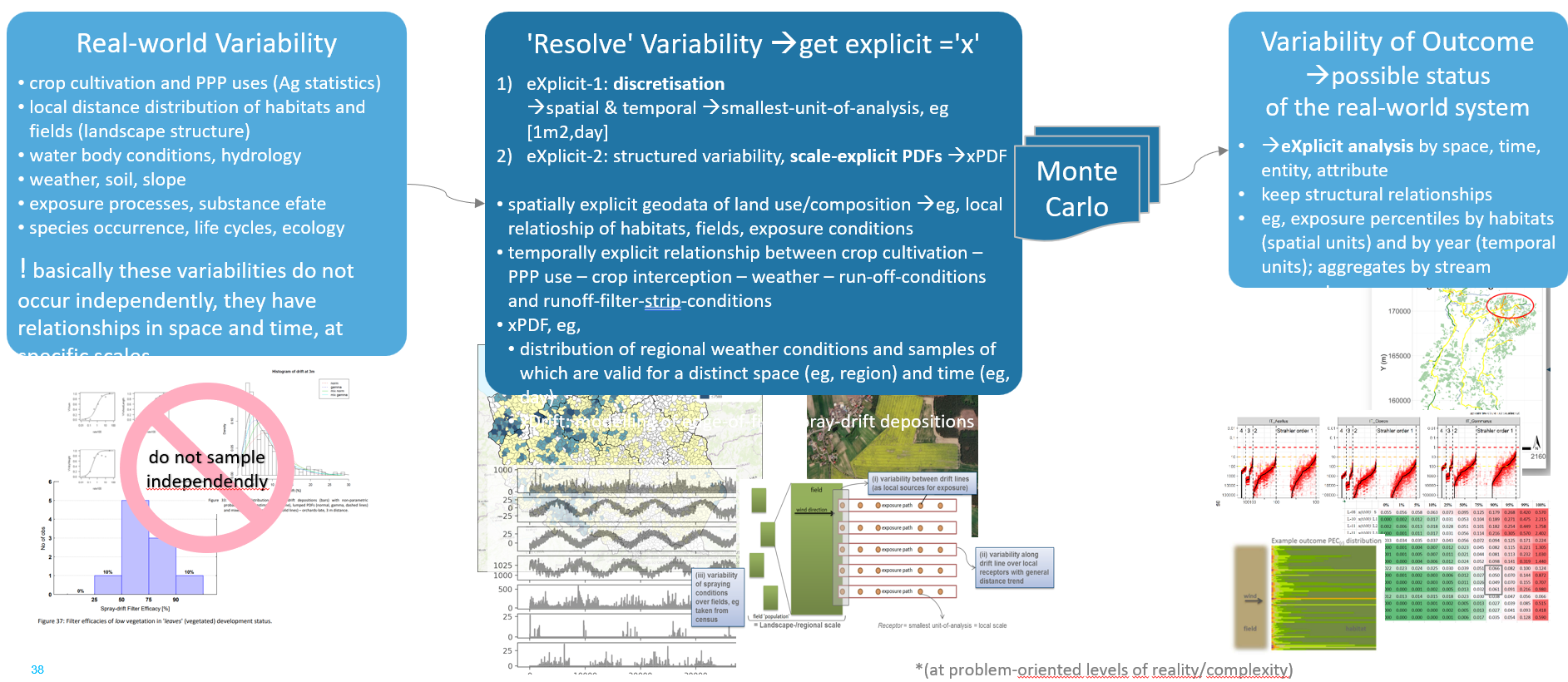
Real-world variability has structure, ie, comes with pattern
Components, Modules and Models
You will read the term component quite often in the context of xLandscape. xLandscape is a modular landscape modelling framework that architecture is derived from Component-Based Software Engineering (CBSE). This is, why the elements of a modular xLandscape model are called components (xDrift is an example for a frequently used component).
Components contain moduls. Modules represent the software that provides the actual functionality of a component, typically a model (eg, an exposure or environmental fate model).
Multidimensional Data Store
Landscape models based on xLandscape is at minimum 3-dimensional (space, time, modelled value). Typically, landscape modelling is using and interested in multiple values in space and time (eg, exposure of different compartments, multiple PPP uses, effects of different species), which makes it a multidimensional landscape model.
Corresponding multidimentsional data is stored using a multidimensional data store. At present, HDF is being used. All landscape model data as defined by the model designer is stored in an HDF store (basically, the in- and outputs of components). Data in the store can come in independent resolutions (eg, PPP use might be represented by the spatial scale field, whereas local exposure of off-field areas might be calculated and stored by m2 as spatial scale). The same applies to any other dimension and scale.
As the multidimensional store contains the data relevant to the specific landscape model, it represents 'the landscape' of the model. Thus, 'the landscape' is built of such data/information that is defined by model design (and configuration). In particular, the store contains the actual model outcome, yet, also any other data is kept as defined by the model designer that might be of interest for the analysis.
At present, a single data store is being used. This, and the technology HDF can be adapted according to future needs.
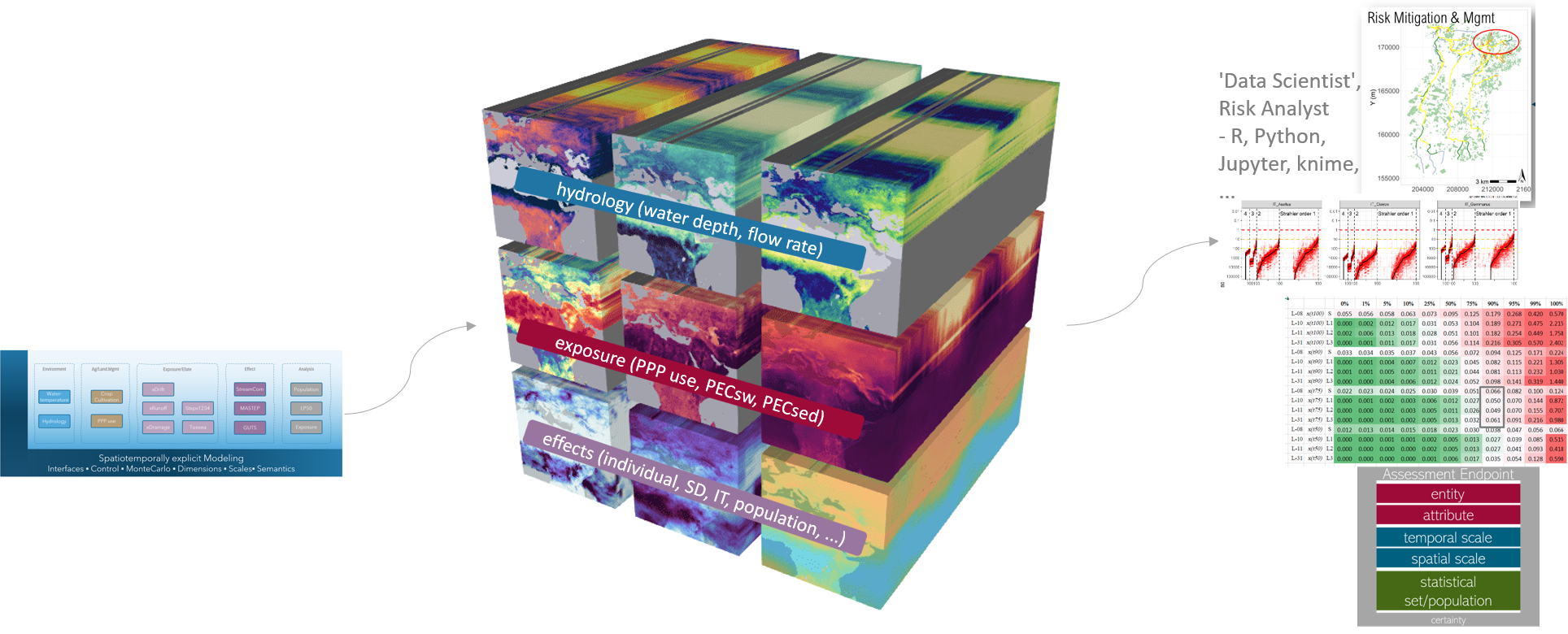
Multidimensional Data Store is implemented in the xAquatic landscape model
Relational Data Representation
With the key aim to facilitate model outcome analysis using common data access technologies, a component (xSQLite) is available that exports defined data from the HDF to SQLite database. Further data exports are under development.
Sequential Processing
At version 1.x, xLandscape has a linear processing sequence. Eg, in a given (or modelled) land use the farmer applies PPPs. These PPPs cause exposure which is subject to substance environmental fate (eg, degradation, distribution). The exposure might cause effects to non-target-organisms. This sequence matches natural causality in a majority of landscape modelling applications, in particular in pesticide risk assessment. However, future demands for landscape modelling might lead to increased autonomy of components' operation.
This sequence is defined in the model configuration file (currently the mc.xml) in the landscape model design phase.
Thus, there are no feedback loops from subsequent components to predecessors.
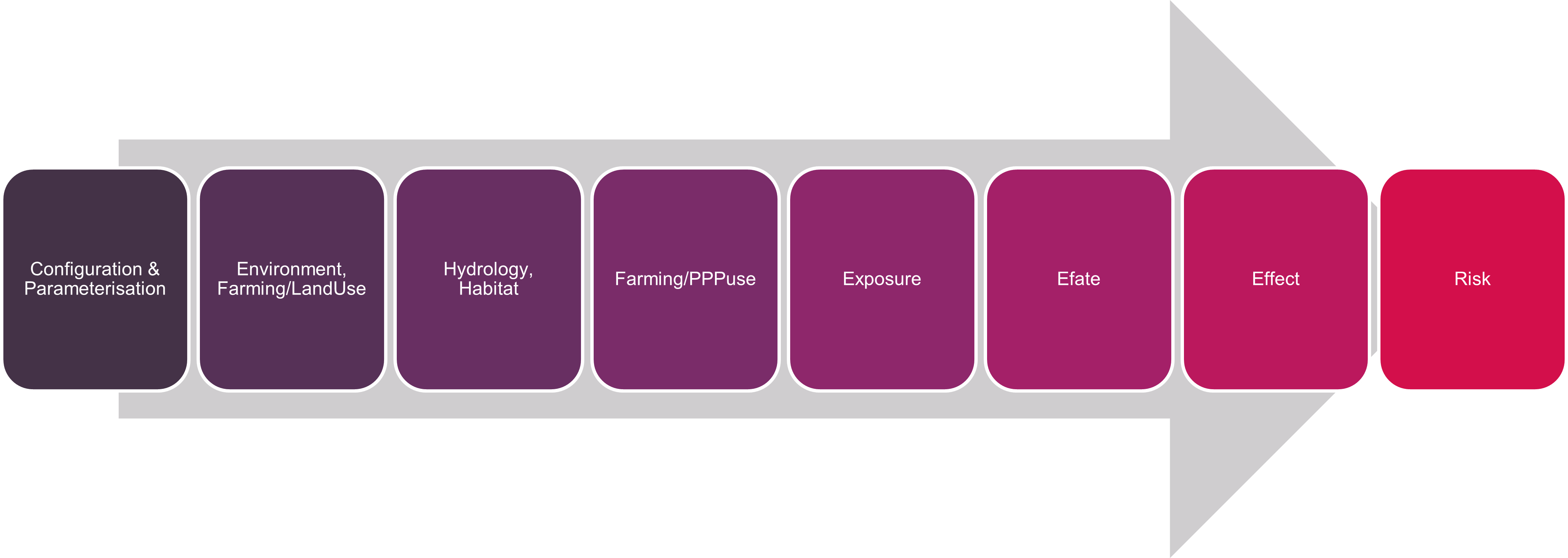
Example sequential processing in xAquatic (2022)
Semantics
When building larger models from individual components, these components need to have a correct understanding of the data/information they exchange. The meaning of values exchanged in inputs and outputs of components need to be clearly described.
The goal in xLandscape is that components understand each other on a machine-level, ie, without any human interference. This level of semantic representation can be reached using ontologies.
In any case, data/information need to be sufficiently documented and described (metadata).
The implementation towards this goal is stepwise: - Current version: values have units, explicit scales; in the landscape model design phase, module developer might need to communicate to clarify semantics (in addition to proper use of metadata). - Next: apply ontolgies (eg, using RDF format)
Model Input (Geo)Data
Input data is specific to the actual landscape model built with the xLandscape framework. Basically, input data are read by individual components and transferred into the Multidimensional Store. In this process the data get's semantically enriched. All components then consistently use the same data, eg, environmental or landuse data.
Data typically come in their native format, eg, geodata as shapefiles, weather data as textfiles or database tables, etc.
Model Output
At present, modelling outcome of landscape models built using the xLandscape framework are stored in a (multidimensional) HDF Store. Common data analysis software and programming languages provide interfaces to HDF.
In addition, components are available and being developed that enable export of data that resides in the HDF store to common data formates (eg, SQLite, other relational databases, csv, or excel).
Analysis
Landscape model outcome can be analysed using common analysis software package or own developed processes.
Typically, landscape models built on the basis of xLandscape contain analysis components that process raw model outcome and provide first insights into the results of an experiment.
Jupyter notebooks (using Python) are used as a means for data analysis. Templates are provided in corresponding Github repositories. Dashboards provide an ideal means to derive insights.
Development and User Level
Typically, landscape models developed built using the xLandscape framework address an expert user level, like any other model used in the regulatory scientific field (eg, FOCUS exposure models, effect models).
However, irrespective of their complexity, these landscape models can be operated in the background (eg, on a back-end server) and only their key outcome displayed or integrated at a user front-end level (like a simple weather forecast is derived from complex weather models).
Differentiation of developer levels are shown in the graphic below.
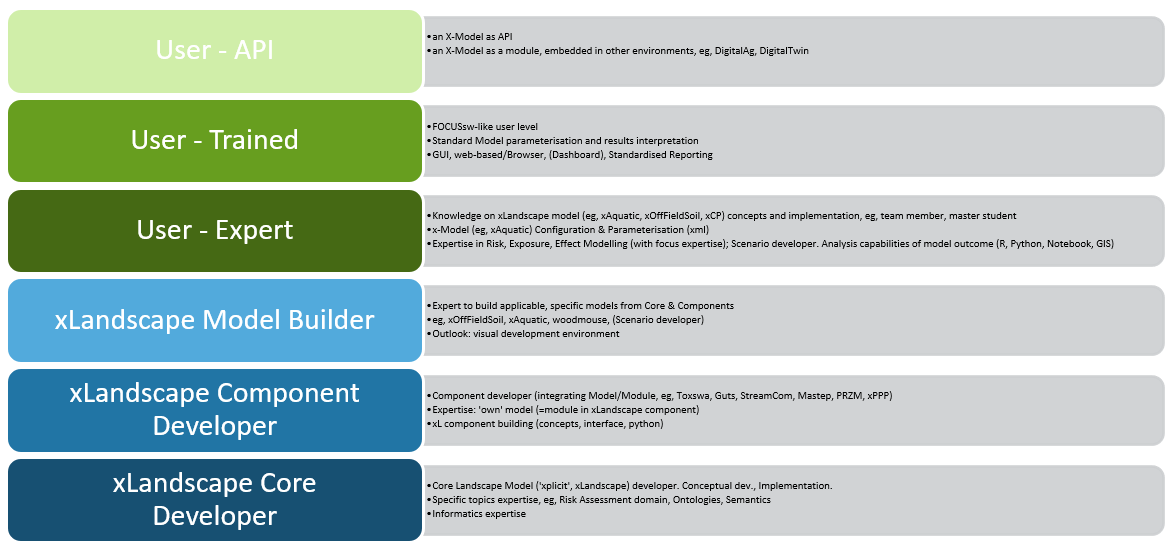
Development and User Levels
Technical Implementation
The xLandscape core is written in Python, hence, building components is done in Python as well.
The actual modules, ie, the models within components that provide the actual modelling functionality of a component can be written in any language.
Code documentation can be found in the corresponding Github repository (eg, https://github.com/xlandscape).